We are kicking off a new
Adsense Optimization series to help you increase revenue (or make more money) from Google Adsense program.
Every week or so, we'll pick a website (or blog) and suggest
various optimization tips including new banner ad formats or ad unit placements that will help these sites maximize their Adsense earnings. You can apply these techniques and learning to your own site if it has a similar layout.
Our first Adsense case study covers
Computer Zen, an excellent blog by Scott Hanselman on Microsoft Technologies. Scott is an MVP, author of
several books and also runs an interesting podcast show -
Hansel minutes. His blog is subscribed by
~8k readers according to Feedburner.
Let's take a quick look at a recent
screenshot of Scott's website - [
The Google ad units and search box have been numbered for easier identification].
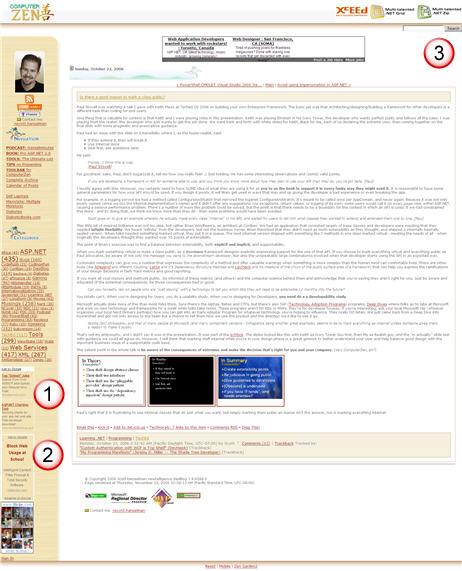
As you probably noticed from the above screenshot,
this site has two Adsense Ad units and one Google Site Search Box. There's also a feedburner ad which we'll skip for the moment.
» There are two 120x240 Ads in the left sidebar. [No 1, 2]
» The Google Search Box is placed in the top right corner [No 3]
Possible Issues with the Current Ad Formats and Layout:1. The 120x240 ads do not blend with the background since they are enclosed inside a white border.
2. The ads are located below the page fold and will therefore be rarely visible to the site visitors.
3. The ads are located in the sidebar - an area that generally doesn't perform so well.
4. Vertical banners like 120x240 are limited to text only ads. Advertisers cannot show image based CPM ads on this site.
5. The Search Box is placed at a perfect location but it takes the visitor off the main page to Google search box.
What can be done to improve Adsense Performance ?The new sample screenshot reflects some very simple Adsense related tweaks that may help Scott improve the ad earnings from Computer Zen.

Each of the tweaks or changes in the above screenshot have been numbered which are explained in the detail below:
No 1:
Link Units can be a very good source of Adsense revenue if placed somewhere near the site navigation links. In Scott's case, that area is the left sidebar just below his profile and picture.
No 2: The 120x240 Ads units have been removed from the left sidebar since they may not be the best performing units due to their placement as well as dimensions.
No 3: The Google Search Box position need not be changed but Scott may connect the search code with Adsense for Search to increase revenue. Additionally,
the search results page should use the new Adsense code that allows visitors to search without leaving the site.
No 4: This is probably the biggest change that will bring him the maximum Adsense revenue - a 250x250 wide format ad unit mixed with the blog content [implemented using div float tag].
The unit should accept both image and text ads.
The border and background color should exactly match the page background color.No 5: This external leaderboard ad from a Job site was based at the top initially. We have moved it at the bottom since
it is probably a non contextual ad system and the results may therefore not be superior to Google Adsense.


 Del.icio.us
 Digg
Digg Reddit
 Facebook
 StumbleUpon